Automattic / Automattic/WP-Job-Manager
Selecting all job types removes the search results count
- Dominant language
- PHP
- Stars
- 899
- Forks
- 369
- Avg merge
- 11h 37m
- Merged PRs (30d)
- 12
Description
#### Steps to Reproduce
1. On the jobs page, select all but one job types:
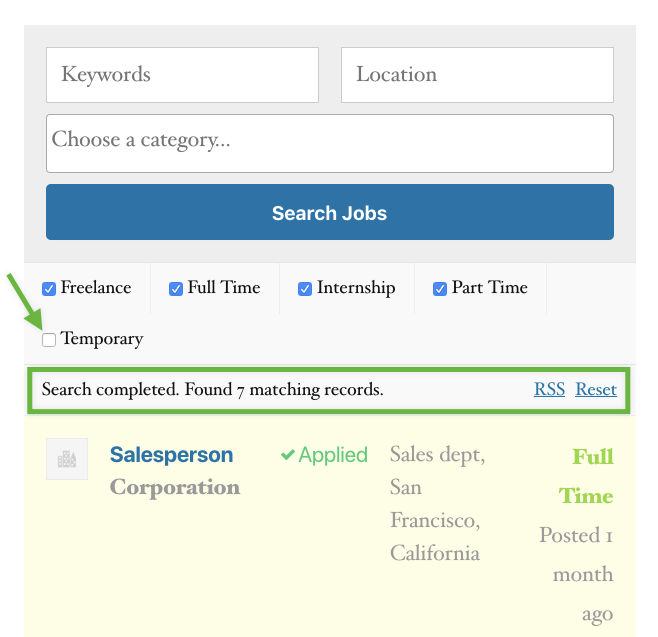
2. Note that it shows "Search completed. Found X matching records"
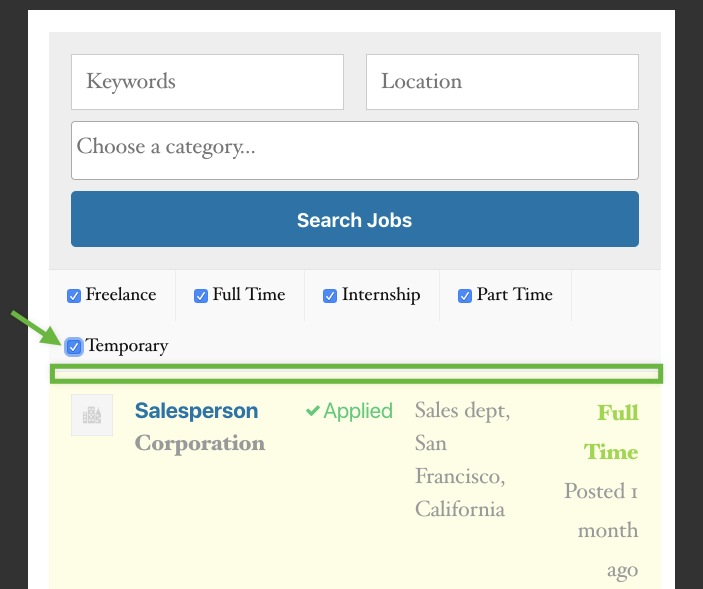
3. Now select all job types...
#### What I Expected
It would still say "Search completed. Found X matching records"
#### What Happened Instead
That section disappears:
#### WordPress / WP Job Manager Version
5.2.2 / 1.33.2
#### Context / Source
Reported in 2152212-zen
Contributor guide
Research direction
Reproduce the issue on the jobs page with WP Job Manager 1.33.2 and WordPress 5.2.2 by selecting all but one job type, then selecting all job types. Trace the search filter and result-count display behavior; done means the “Search completed. Found X matching records” message remains visible after selecting all job types.
Written by the indexing model from the issue text.
Assessment
- Tech stack
- php
- Domain
- frontend
- Issue type
- Bug
- Difficulty
- 3/5
- Estimated time
- 1-2 days
- Activity status
- Stale
- Clarity
- Mostly clear
- Newbie friendliness
- 38/100