Automattic / Automattic/WP-Job-Manager
Optimize CSS to avoid clashing of generically named classes | Label class
- Dominant language
- PHP
- Stars
- 899
- Forks
- 369
- Avg merge
- 11h 37m
- Merged PRs (30d)
- 12
Description
#### Steps to Reproduce
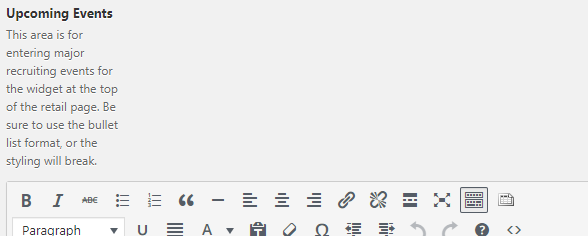
1. View text of any label elements
2. Notice width issue
#### What I Expected
Text should fill available width
#### What Happened Instead
.label width is set to 120px and makes labels look squished
#### WordPress / WP Job Manager Version
4.9.4 / 1.29.2
#### Browser / OS Version
Chrome / Windows 7
#### Screenshot / Video
#### Context / Source
Upon looking at the panel.css file that is a part of wp-job-manager, I noticed several classes that are named generic enough that they may clash with other site CSS. My recommendation is to give wp-job-manager styles more specificity to only effect intended areas or styles and not all of them. One option would even be as simple as a prefix to class names or something similar. I'm all for dry CSS and making it as simple as possible.
Contributor guide
Research direction
Start with panel.css and reproduce the label width problem described in the issue on a WP Job Manager page. Review the generic selectors and their affected elements; the work is done when labels use the available width without unintended clashes with site CSS.
Written by the indexing model from the issue text.
Assessment
- Tech stack
- css
- Domain
- frontend
- Issue type
- Bug
- Difficulty
- 3/5
- Estimated time
- 1-2 days
- Activity status
- Stale
- Clarity
- Mostly clear
- Newbie friendliness
- 35/100