Pipe/Duct Fittings material bug
- Dominant language
- C#
- Stars
- 637
- Forks
- 225
- PR merge metrics
- No merged PRs in 30d
Description
In Revit you normally use the same Duct and Fitting types for different system types like "Supply Air" and "Return Air".
"Supply Air" one color and "Return Air" another color.
In the bottom picture blue is Supply an orange is Return.
And system types are inherited from the equipment connectors.
So it wouldnt make sense to separate ducts and fitting types by systemtype in Revit.
The color of fittings is determined by the Material parameter on the system.
And this is fine.

But when exported this color is associated with the fitting type.
So any fitting of the same type will get the same color regardless which system type it belongs to:
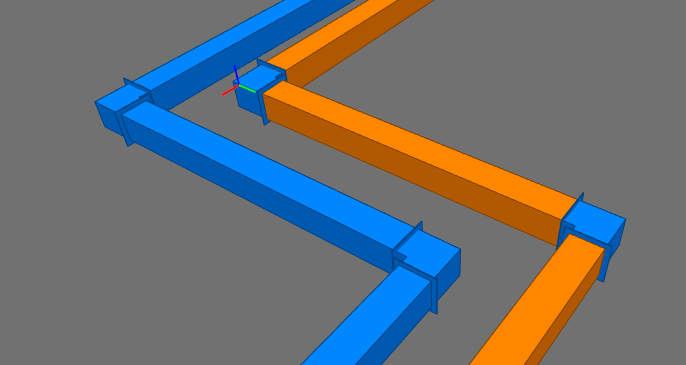
Thats why the fitting in the orange system has the same color as in the blue system.
The exporter gets to the first fitting (which happens to be the blue system), cache the type and color.
And then resuse that color on the next fitting of that type.
This is probably just a small bug in a cache somewhere.
Contributor guide
Research direction
Reproduce the export with Supply Air and Return Air systems that use the same duct or fitting type, then trace the fitting export path and its type/color cache. The issue’s screenshots and description define done: fitting colors must follow each system’s material rather than the first fitting exported for that type.
Written by the indexing model from the issue text.
Assessment
- Tech stack
- csharp
- Domain
- tooling
- Issue type
- Bug
- Difficulty
- 3/5
- Estimated time
- 1-2 days
- Activity status
- Stale
- Clarity
- Mostly clear
- Newbie friendliness
- 45/100