IFC geometry is different from Revit geometry
- Dominant language
- C#
- Stars
- 637
- Forks
- 225
- PR merge metrics
- No merged PRs in 30d
Description
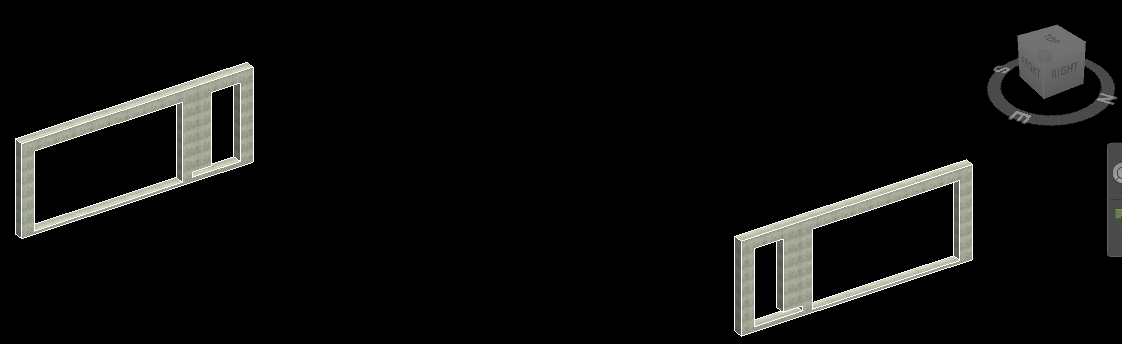
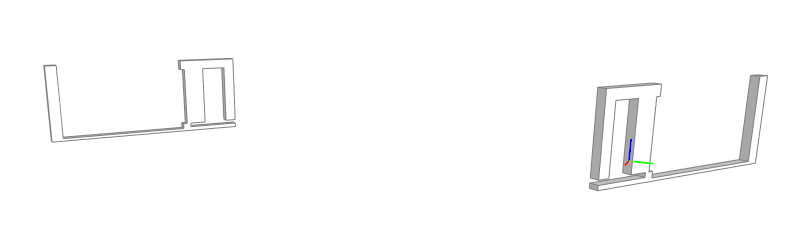
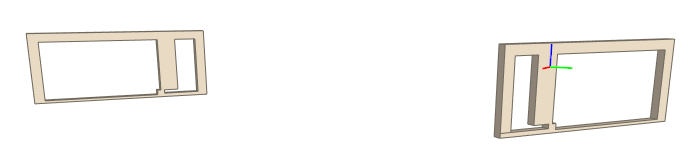
I used Revit 2020.1 with latest revit-ifc addon from this repo to export from .rvt to .ifc. There were 2 elements that have different geometry from original Revit element's geometry. Both IFC 2x3 Coordination View 2.0 and IFC 4 Reference View had this issue, although exported geometry were different from each other (and different from Revit geometry also).
Their Element IDs: **4367689, 4367770**
### Attachment:
Here's rvt file and both ifc files bundle in a zip file: [revit-ifc issue.zip](https://github.com/Autodesk/revit-ifc/files/5009707/revit-ifc.issue.zip)
### Images:
Revit Geometry:
---
IFC 2x3 Coordination View 2.0 Geometry (opened in BIM Vision):
---
IFC 4 Reference View Geometry (opened in BIM Vision):
Contributor guide
Research direction
Start by reproducing the export with the attached RVT and IFC files, comparing elements 4367689 and 4367770 in Revit and both IFC views. Use these files as the regression case; done means the exported geometry matches the corresponding Revit geometry.
Written by the indexing model from the issue text.
Assessment
- Tech stack
- csharp
- Domain
- computer-graphics
- Issue type
- Bug
- Difficulty
- 4/5
- Estimated time
- 3-5 days
- Activity status
- Stale
- Clarity
- Mostly clear
- Newbie friendliness
- 35/100