[MAYA-128731] Creating the USDPreviewSurface Shader inside the Hypershade results in a broken shader
- Dominant language
- Wolfram Language
- Stars
- 905
- Forks
- 223
- Avg merge
- 2d 9h
- Merged PRs (30d)
- 17
Description
**Describe the bug**
When creating a USD Preview Surface shader via the Hypershades Create Menu, it'll connect the outColor to the displacement input of the ShaderGroup instead of the Surface Shader connection.
Creating the shader via Right Clicking on an object and assigning a new shader from there works fine however. So this seems to be just an issue in the Hypershade flow?
**Steps to reproduce**
Steps to reproduce the behavior:
1. Open Hypershade
2. Go to Create>Materials>USD Preview Surface
3. Inspect the shader in the node editor below it and see that it's connected to the displacement instead of the surface
**Expected behavior**
A clear and concise description of what you expected to happen.
**Attachments**


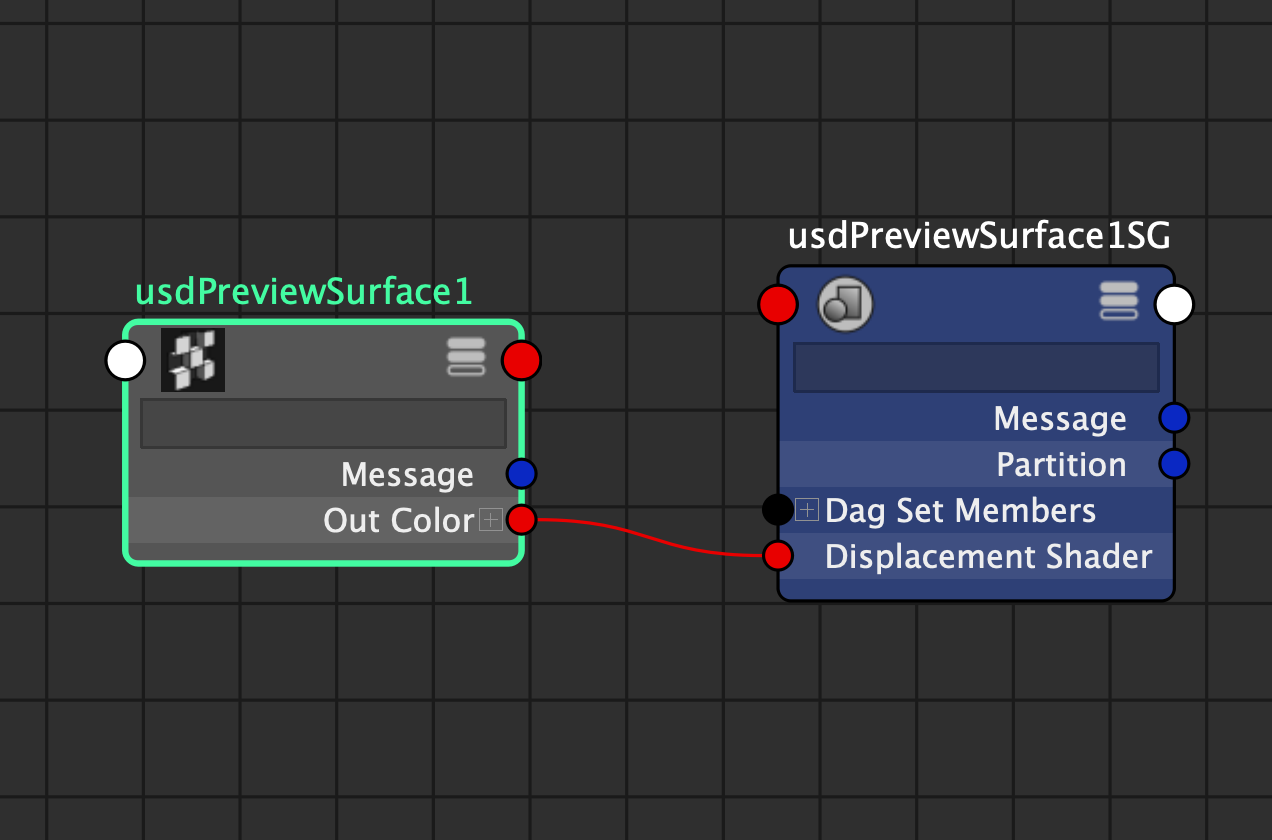
**Specs (if applicable):**
- OS & version macOS 13
- Maya version Maya 2023
- Maya USD 0.22
Contributor guide
No contributing guide indexed for this repository
Assessment
This issue has not been assessed yet.