SkeletonItem white lines on Chrome when zoomed
Open
bug
community
Feynman
- Dominant language
- JavaScript
- Stars
- 193
- Forks
- 112
- PR merge metrics
- No merged PRs in 30d
Description
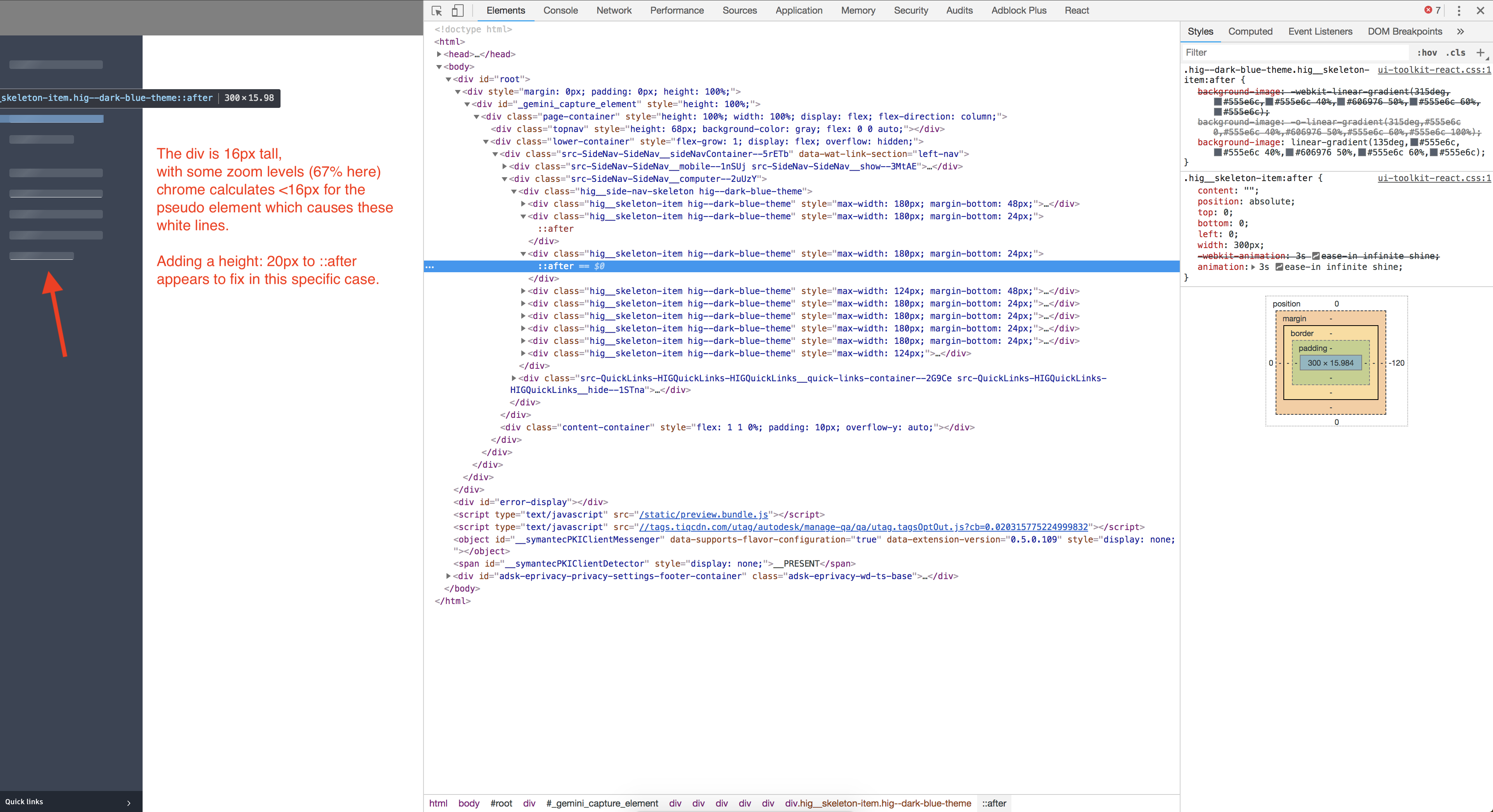
When viewing SideNav Skeleton/SkeletonItem(s) on chrome when at a 67% or 110% zoom the pseudo-element is calculated less than the height of the div. As noted in the screenshot forcing a height of the pseudo-element to something larger removes the line but a more general solution is probably needed. This causes white lines to appear:
Contributor guide
Research direction
Start by locating the SideNav Skeleton and SkeletonItem components and their pseudo-element styling. Reproduce the white lines in Chrome at 67% and 110% zoom, then inspect the pseudo-element height relative to its containing div. Done means the white lines no longer appear at those zoom levels and the general behavior remains correct.
Written by the indexing model from the issue text.
Assessment
- Tech stack
- javascript
- Domain
- frontend
- Issue type
- Bug
- Difficulty
- 3/5
- Estimated time
- 1-2 days
- Activity status
- Stale
- Clarity
- Mostly clear
- Newbie friendliness
- 35/100