AutoDarkMode / AutoDarkMode/Windows-Auto-Night-Mode
More user-friendly Hotkeys assignment User interface
- Dominant language
- C#
- Stars
- 9.7k
- Forks
- 308
- Avg merge
- 2d 58m
- Merged PRs (30d)
- 3
Description
Currently, assigning one of several hotkeys requires an unusual process that needs to be done in this order :
1. Turning off 'Enable system-wide hotkeys'
2. Entering the hotkeys you want in the user interface
3. Then turning on 'Enable system-wide hotkeys'
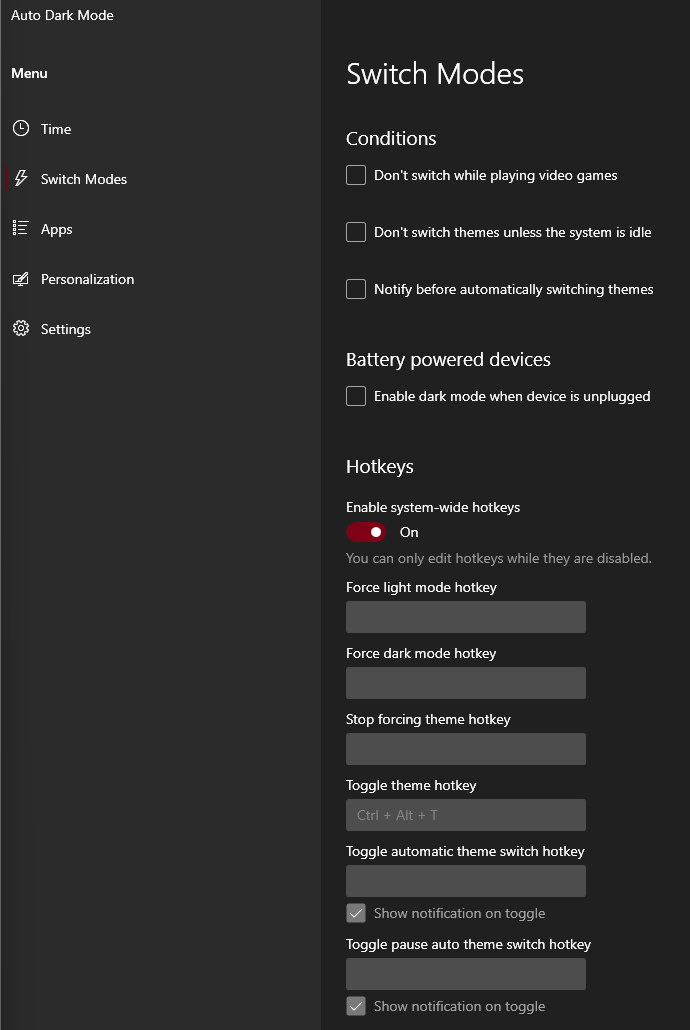
The problem is for any none Auto Dark Mode advanced user, it is not an usual way to specify hotkeys. In most apps (ex: Ditto, Flow Launcher), you just have to enter the hotkey, without having to fiddle with an on/off writing switch.
Here is are examples of user friendly hotkey setting interface:

This is taken from Flow Launcher, an other opensource application for Windows. As you can see there is no on/off writing switch to enter the hotkeys.
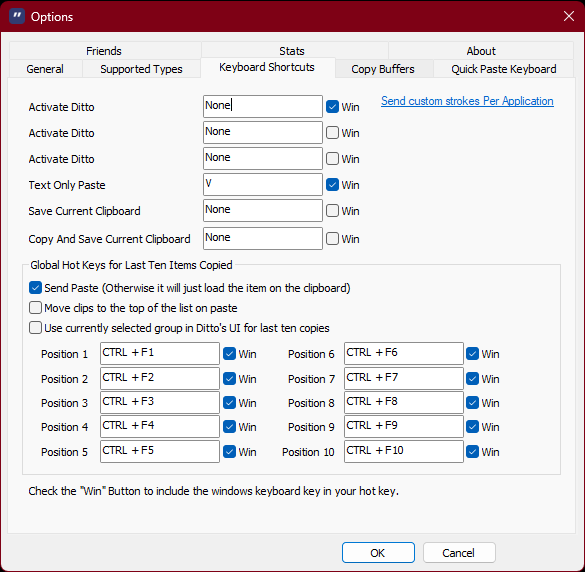
This is taken from Ditto, an other opensource application for Windows. There is a lot hotkeys that can be entered, and there is no on/off switch for entering these hotkeys.
Contributor guide
No contributing guide indexed for this repository
Assessment
This issue has not been assessed yet.