ArduPilot / ArduPilot/MissionPlanner
Data: DroneId tab always appears
- Dominant language
- C#
- Stars
- 2.4k
- Forks
- 2.9k
- Avg merge
- 19h 16m
- Merged PRs (30d)
- 4
Description
The DroneId tab always appears by default on the Data screen but if users then right-mouse-button-click and "Customise" and then press OK (without checking or unchecking any boxes) it disappears. It then seems impossible to make it re-appear without restarting MP.
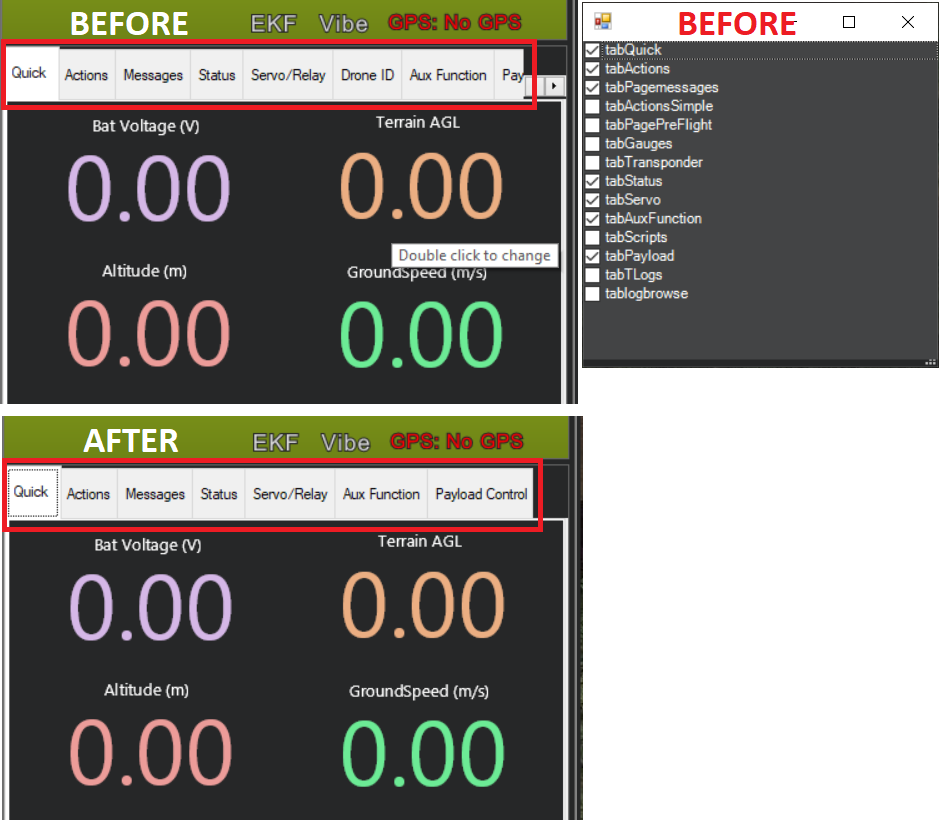
I think a work-around is to enable/disable the DroneId plugin but I actually couldn't find where to do this. I'm sure it's somewhere..
Contributor guide
No contributing guide indexed for this repository
Research direction
Reproduce the issue from the Data screen: right-click, choose "Customise", and press OK without changing selections. Trace how the DroneId tab visibility is stored and restored, then verify that the tab remains available after customization and can be made visible again without restarting Mission Planner.
Written by the indexing model from the issue text.
Assessment
- Tech stack
- csharp
- Domain
- desktop
- Issue type
- Bug
- Difficulty
- 3/5
- Estimated time
- 1-2 days
- Activity status
- Stale
- Clarity
- Mostly clear
- Newbie friendliness
- 38/100