ArduPilot / ArduPilot/MissionPlanner
SR0_ parameters changing when calibrating R/C inputs
- Dominant language
- C#
- Stars
- 2.4k
- Forks
- 2.9k
- Avg merge
- 19h 16m
- Merged PRs (30d)
- 4
Description
#### Issue details
With the latest stable and beta builds of Mission Planner, running the RC Calibration is changing SR0_ parameters and leaving them, stopping some Mavlink messages coming through after. I noticed this while setting up a new plane using a Matek F765-WSE flight controller on the latest stable firmware. (4.2.3) I also tried 4.3.0beta3 firmware, as well as an older stable build 4.2.0 with no changes. I experimented some more to troubleshoot:
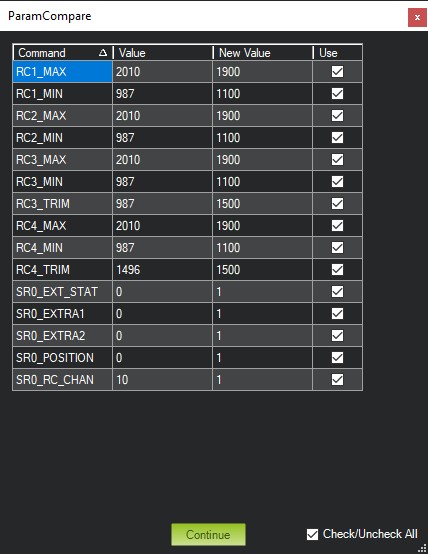
I loaded the defaults in firmware on the FC, saved those params to a file, then ran the RC Calibration, rebooted, and again saved params to a file to compare the two. These are all the changes:
Parameter New Default
RC1_MAX 2010 1900
RC1_MIN 987 1100
RC2_MAX 2010 1100
RC2_MIN 987 1100
RC3_MAX 2010 1100
RC3_MIN 987 1100
RC3_TRIM 987 1500
RC4_MAX 2010 1100
RC4_MIN 987 1100
RC4_TRIM 1496 1500
SR0_EXT_STAT 0 1
SR0_EXTRA1 0 1
SR0_EXTRA2 0 1
SR0_POSITION 0 1
SR0_RC_CHAN 10 1
So all the RCx params look normal (with the exception of my yaw input, I need to center it with subtrims I guess... lol) but the SR0 params explain why the horizon indicator among other things stops working after I calibrate R/C inputs. Looking at what's changed, my guess is that it's intentional, to give you a faster/smoother display of the inputs during calibration, but they're not being set back to defaults after calibration is finished. If I manually set those back, everything works normally again.
Thinking more about this, I remembered that in Mission Planner's configuration, I've set all the "Telemetry Rates" (attitude, position, mode/status, RC, and Sensor) to "-1". My reasoning for this was for my planes that use Dragonlink, Dragonlink suggests using set rates for telemetry (http://www.dragonlinkrc.com/instructions/v3equipment/radiomodem/) and when connecting to the plane with Mission Planner those were being changed to what was set in MP's config. It was suggested that setting those in MP to "-1" would leave them as set in the FC and not change them. I've been using everything like this for a while now without issue, but I honestly don't remember if I've built a new plane and ran RC Calibration after making this change or not, but chances are good that I have... lol
Just to verify, I changed those rates in MP config to some value I'd recognize (2) and ran the calibration again. The rates were all set to the new value of 2 now, matching what's in MP's config.
Perhaps this is a change in more recent build of Mission Planner, or perhaps I just haven't calibrated a new build since changing those rates in MP config.
#### Version
Mission Planner 1.3.77 build 1.3.8110.38294 (also current latest beta, not sure version/build number) Plane f/w 4.2.0, 4.2.3, and 4.3.0beta3
#### Platform
[ ] All
[ ] AntennaTracker
[ ] Copter
[ X ] Plane
[ ] Rover
[ ] Sub
#### Airframe type
Standard airplane with a tail (Esky Eagle / Aeroscout)
#### Hardware type
Matek F765-WSE, TBS Crossfire Nano RX using CRSF protocol (also tested with SBUS while troubleshooting)
#### Logs
n/a
Contributor guide
No contributing guide indexed for this repository
Research direction
Start with the Mission Planner RC Calibration workflow and the Telemetry Rates configuration, reproducing the issue with the listed Plane firmware and hardware setup. Compare SR0_* values before and after calibration; the fix is complete when calibration leaves the configured telemetry rates intact and MAVLink messages such as horizon data continue normally.
Written by the indexing model from the issue text.
Assessment
- Tech stack
- csharp
- Domain
- desktop
- Issue type
- Bug
- Difficulty
- 4/5
- Estimated time
- 3-5 days
- Activity status
- Stale
- Clarity
- Mostly clear
- Newbie friendliness
- 35/100