ArduPilot / ArduPilot/MissionPlanner
Full Param Tree: Out of range box's No button does not restore param viewed in list
- Dominant language
- C#
- Stars
- 2.4k
- Forks
- 2.9k
- Avg merge
- 19h 16m
- Merged PRs (30d)
- 4
Description
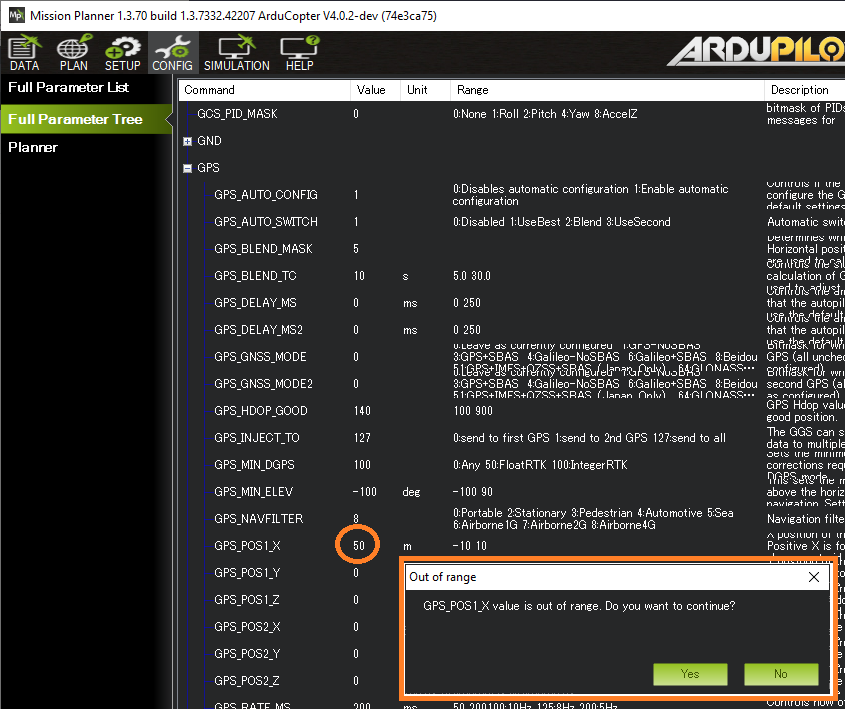
It's only a visualisation error (i.e. the parameter value is not actually changed on the vehicle) but I would expect that if I click "No" on the "Out of range" pop-up box the parameter would be restored to it's previous value. I.e. the value that's on the vehicle or better yet the latest value that I change the parameter to.
The way I think it should work:
Example1:
- value retrieved from the vehicle is 2
- I change the value to 60, and then click "Yes" on the "Out of range" value then it should change to 60.
- If I'd clicked "No" then I would expect the value to return to "2".
Example2:
- value retrieved from the vehicle is 2
- I change the value to 60, and then click "Yes" on the "Out of range" value then it should change to 60.
- I change the value to 20 and then click "No" on the "Out of range" value then it should change to 60.
Contributor guide
No contributing guide indexed for this repository
Research direction
Start by reproducing the issue in the Full Param Tree with the two value-change sequences described, focusing on the "Out of range" prompt's No action. Trace the UI state that displays the parameter value; done means No restores the previously accepted value while leaving the vehicle parameter unchanged.
Written by the indexing model from the issue text.
Assessment
- Tech stack
- csharp
- Domain
- desktop
- Issue type
- Bug
- Difficulty
- 3/5
- Estimated time
- 1-2 days
- Activity status
- Stale
- Clarity
- Mostly clear
- Newbie friendliness
- 45/100