ArduPilot / ArduPilot/MissionPlanner
Flight Data, Quick screen can't display 2 x 2
- Dominant language
- C#
- Stars
- 2.4k
- Forks
- 2.9k
- Avg merge
- 19h 16m
- Merged PRs (30d)
- 4
Description
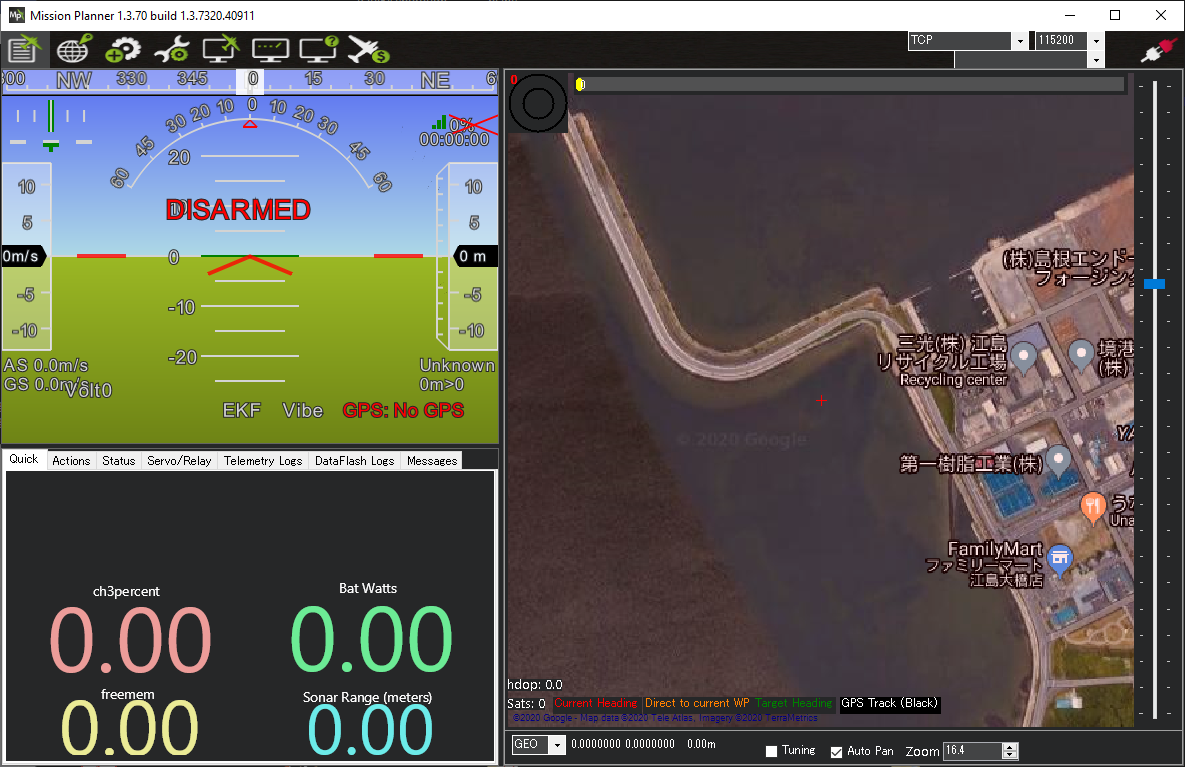
I found today that the Flight Data Quick screen can't display 2 x 2 (i.e. 2 columns x 2 rows). It allows the user to specify 2 columns x 2 rows but then it actually still displays room for 3 rows.
If you check out the image below you can see that the top row is left blank. Also slightly strangely the size of the text on the bottom row is smaller than the middle row.
Contributor guide
No contributing guide indexed for this repository
Research direction
Start by reproducing the Flight Data Quick screen issue with a 2-column by 2-row layout and inspect the screen's layout code. Done means the configured 2×2 view displays exactly two rows, with no blank top row and consistent text sizing across the visible rows.
Written by the indexing model from the issue text.
Assessment
- Tech stack
- csharp
- Domain
- desktop
- Issue type
- Bug
- Difficulty
- 3/5
- Estimated time
- 1-2 days
- Activity status
- Stale
- Clarity
- Mostly clear
- Newbie friendliness
- 35/100