ArduPilot / ArduPilot/MissionPlanner
CTRL-F "temp" menu complexity
- Dominant language
- C#
- Stars
- 2.4k
- Forks
- 2.9k
- Avg merge
- 19h 16m
- Merged PRs (30d)
- 4
Description
#### Issue details
The CTRL-F menu is a default catch-all for just about all new features and tools that are hidden to new users. Having this menu accessed by a random keyboard sequence (CTRL-F) makes no sense to most users, and it's especially frustrating for touch-screen only devices that are becoming more and more common. It looks like a temporary window that was meant to test a few new beta features, but now it's evolved into a mess. It's even titled "temp," yet it houses some of the most powerful features that have been fully tested and are ready for prime time out in the open.
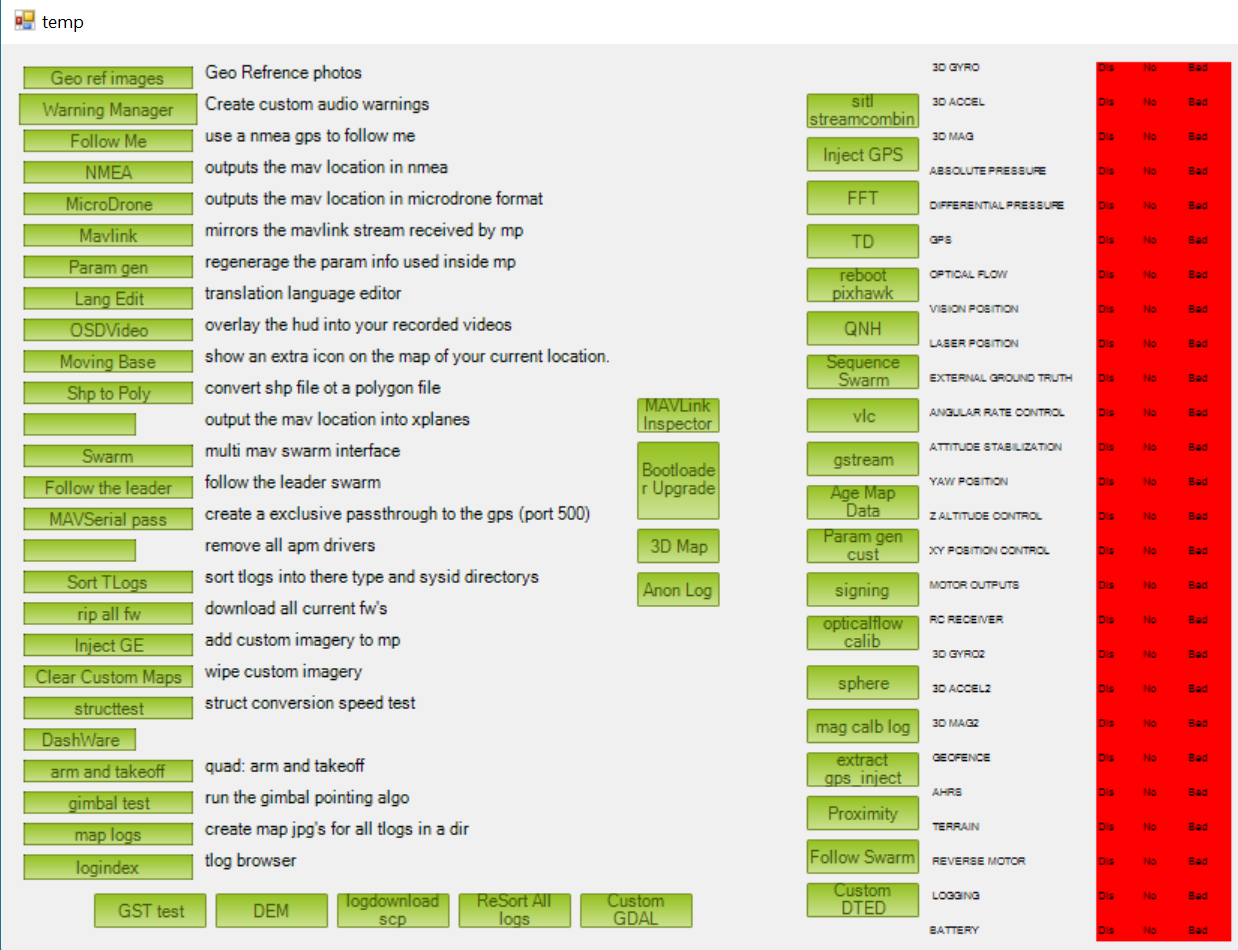
I have a few suggestions:
#### Remove the tools accessed from this list and put them where they belong.
Examples:
Geo-ref images should go with the DF log review buttons
Warning Manager should go with the Planner setup options
Follow-me should go with the scripts tab under the HUD
Moving Base should go under the live map in the Flight Data screen
Map Logs should go with the TLOG browser buttons.
DASHWARE should go with the DF Logs
It appears like the menu itself is some sort of color-status screen that really belongs as its own window or tab under the VFR HUD. Unfortunately the font next to the items is far too small to be readable in the field.
My point is that this list is cluttered, disorganized, and most of the items do not belong together in a hidden menu. Put them where they belong.
#### Make a top tab for advanced options for items that don't belong anywhere else

That should get around hiding these things
#### Document these tools and what they do.
More than half of these buttons have no description, and it's sad that users could be using these features that are already built. I'm not asking for a wiki page on each one, but at least a sentence or two would help out a lot. RTK is only enabled by a button called "Inject GPS" with no description or direction on how to get there unless you find a tutorial. It shouldn't require a tutorial to use fairly simple features in mission planner that should be accessible to most of the users.
And on the topic of Hiding Menus, I don't understand why propagation settings is hidden by CTRL-W. That's not shown or documented anywhere, and it appears like a cool too that could be used for flight planning. Please move that to a logical place for access as well.
Contributor guide
No contributing guide indexed for this repository
Research direction
Start by locating the CTRL-F and CTRL-W entry points and inventorying the listed tools across the Flight Data, VFR HUD, DF Logs, Planner setup, scripts, and TLOG browser areas. Done would require an agreed placement for each tool, a usable advanced-options location, and descriptions for the documented features.
Written by the indexing model from the issue text.
Assessment
- Tech stack
- csharp
- Domain
- design, desktop, documentation
- Issue type
- Feature
- Difficulty
- 5/5
- Estimated time
- Over a week
- Activity status
- Stale
- Clarity
- Needs clarification
- Newbie friendliness
- 25/100