ArduPilot / ArduPilot/MissionPlanner
DataFlash log viewing map zoom and reposition are a bit difficult to use
- Dominant language
- C#
- Stars
- 2.4k
- Forks
- 2.9k
- Avg merge
- 19h 16m
- Merged PRs (30d)
- 4
Description
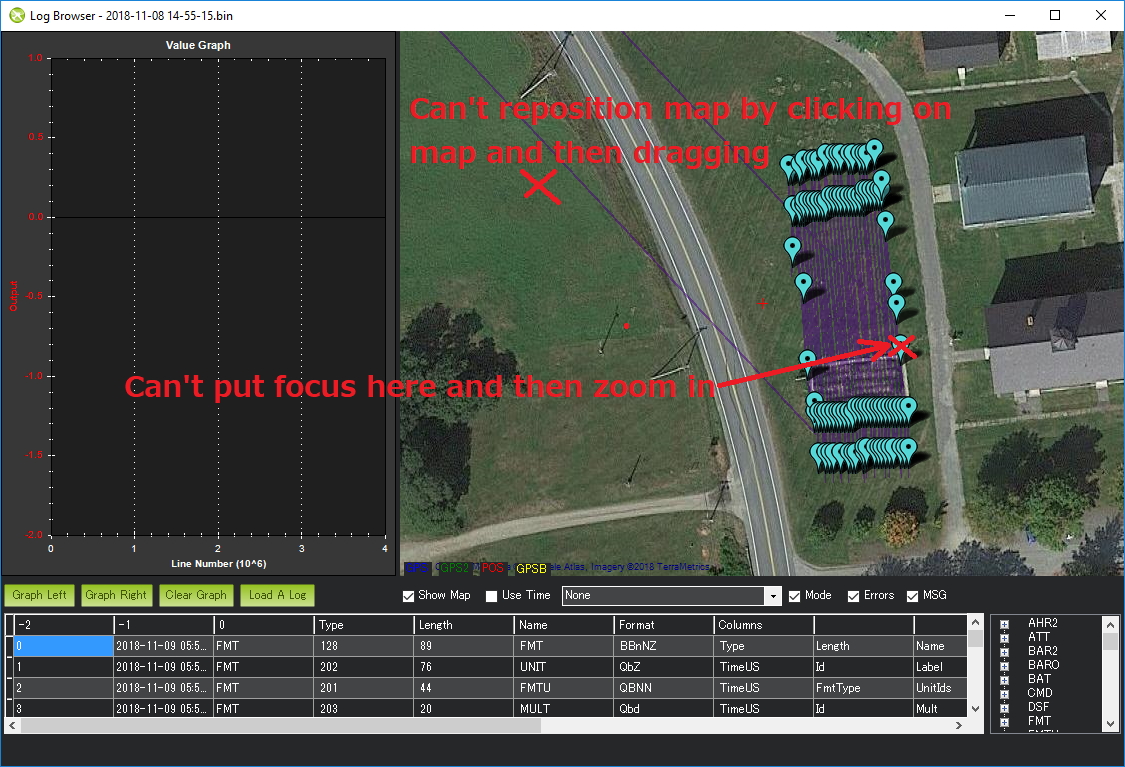
I sometimes use the "Show Map" option on the dataflash log viewer screen but I've noticed two issues with the map:
1. it's not possible to reposition the map by click and dragging. This means to change the view the user must zoom out (with the mouse wheel), place the cursor over the area they want to view and then zoom in (with mouse wheel)
2. the zoom-in and zoom-out (using the mouse wheel) don't work if the pointer is directly over a waypoint. This a bit annoying because the waypoints can't be moved on this screen so there's no real danger of zooming in or out right on them. Especially when there are a lot of waypoints clustered together it makes it difficult to zoom in right where I want to.
Contributor guide
No contributing guide indexed for this repository
Research direction
Start from the Show Map option on the DataFlash log viewer screen and reproduce both reported interactions: dragging to reposition and zooming over waypoints. Done means the map can be click-dragged and mouse-wheel zoom works when the pointer is directly over a waypoint.
Written by the indexing model from the issue text.
Assessment
- Tech stack
- csharp
- Domain
- desktop
- Issue type
- Bug
- Difficulty
- 3/5
- Estimated time
- 1-2 days
- Activity status
- Stale
- Clarity
- Mostly clear
- Newbie friendliness
- 35/100