Altinn / Altinn/app-frontend-react
Simplified/improved Likert
- Dominant language
- TypeScript
- Stars
- 21
- Forks
- 33
- Avg merge
- 6d 23h
- Merged PRs (30d)
- 3
Description
## Background and problem description
The [`Likert` component](https://docs.altinn.studio/app/development/ux/components/likert/) is visualized as a table, where:
1. The first column contains questions
2. The rest of the columns contains options for answers (represented as a one radio button per cell)
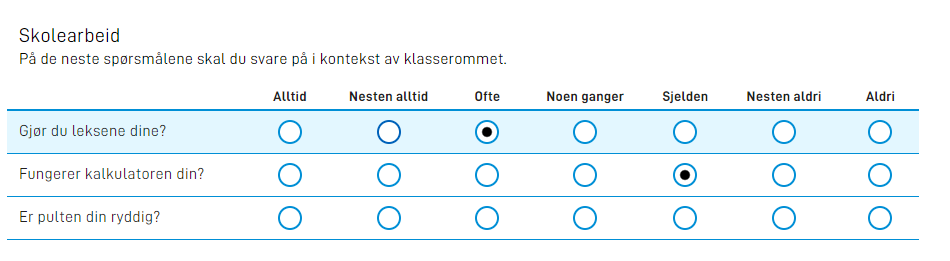
While the `Likert` component works well for this scenario, and has proved useful in the app it was originally made for, the structure and setup brings with it quite a few complexities. In order to set this up, you will have to:
1. Create a data model structure correlating to a releating group (`Object[]`), where:
a. The question is put in one of the object properties (or a text resource key for the question, which causes the Likert component to rely on recursive - or at least two-level-deep - resolving of text resources)
b. The answer is supposed to be stored alongside the question in the same object
2. Set up a `Group` container first, that contains the `Likert` component as the only child. The `Group` has to set the special property of `edit.mode = likert` which causes the `Group` with a `Likert` child to transform into a Likert table as displayed above. Functionally, this intercepts our existing repeating Group code, and renders a special Likert table instead.
3. Optionally, one might add a `edit.filter` property on the `Group` component to split one large repeating `Object[]` structure into multiple Likert scales, each containing a subset of the questions in the repeating structure. In the `frontend-test` app, this includes an example where the first 3 questions are optional, while the next 3 are required.
**The challenge**
While this setup is quite powerful (one can define questions in the data model, and even add user-provided questions from previous pages using repeating groups), it might be overkill for simpler use-cases. Tying the use of the Likert component to a specific data model structure of repeating groups, and forcing this advanced setup, might deter some application developers from using the component.
## Technical suggestion
One of the benefits of the `dataModelBindings` concept is the freedom you get to structure your data model to how _you_ (or the receiving end) wants it, not how the layout components wants the structure to look like. In addition, because every row in the Likert table uses the same `Likert` component definition, each row by definition has to use the same text resource binding for the question, leading to smart hacks using text resource variables to look up the actual question from the data model.
While I think the above section on the problem description can stand on its own, and those solving this issue should use their creativity to arrive at a good solution, I'll kick off the discussion by providing my own thoughts.
While most `dataModelBindings` use `simpleBinding` as the only key, we shouldn't be limiting ourselves to that. For example, the [`List` component](https://docs.altinn.studio/app/development/ux/components/listcomponent/) fetches a structure from an API that is identical to the structure of repeating groups (`Object[]`), and lets you select one of those rows. Note that the List component lets you store one or more of the cells/properties of that row/object into whatever location in the data model you'd like. In fact, it is very possible to extend the `List` component to use a repeating group structure from the data model as the data source (letting you select one of the rows from a previous repeating group).
**Question sources**
I think the `Likert` component should support a wide variety of question sources, for example:
- A static list of questions, as defined in the layout file (just as a static list of options, like other selection components already support)
- Any options ID (either fetched from a static JSON file or [dynamically](https://docs.altinn.studio/app/development/data/options/#dynamic-codelists-generated-runtime))
- A repeating group in the data model (as is supported today, but using our [existing support for fetching options from repeating groups](https://docs.altinn.studio/app/development/data/options/#options-based-on-repeating-groups-from-the-data-model))
With a list of options being the source of questions, the number of radio buttons becomes a result of ` x `. It would also allow for a much simpler setup of the `Likert` component, such as:
```json
{
"id": "my-likert-table",
"type": "Likert",
"textResourceBindings": {
"title": "Please answer the following questions"
},
"questionOptions": [
{
"label": "Have you created an Altinn 3 app before?",
"value": "have-created-app"
},
{
"label": "Do you prefer the Altinn platform over others?",
"value": "prefer-altinn"
}
],
"answerOptions": {
{
"label": "Yes",
"value": "yes"
},
{
"label": "No",
"value": "no"
},
{
"label": "Prefer not to answer",
"value": "no-answer"
}
},
"required": false,
"readOnly": false
}
```
Or with questions and answers loaded externally:
```json
{
"id": "my-likert-table",
"type": "Likert",
"textResourceBindings": {
"title": "Please answer the following questions"
},
"questionOptionsId": "myQuestions",
"answerOptionsId": "myAnswers",
"required": false,
"readOnly": false
}
```
**Answer bindings (`dataModelBindings`)**
Now this begs the question; how do we bind these answers to the data model? I can think of two options, depending on the complexity of your setup, and how dynamic it is.
If you're implementing the static example above, with two fixed questions, you can get away with mapping these two answers to whatever locations in the data model you'd like (individually), such as:
```json
"dataModelBindings": {
"have-created-app": "Questions.HaveCreatedApp",
"prefer-altinn": "Questions.PreferredAltinn"
}
```
Which might create a data model such as:
```json
{
"Questions": {
"HaveCreatedApp": "yes",
"PreferredAltinn": "no-answer"
}
}
```
On the other hand, if you're using a varying set of questions, mapping each one manually might not be sustainable, so a more dynamic binding might be in order. We can use this to create a new repeating group structure:
Example generic mapping:
```json
"dataModelBindings": {
"__question__": "Questions.Question",
"__answer__": "Questions.Answer"
}
```
Resulting data model:
```json
{
"Questions": [
{
"Question": "have-created-app",
"Answer": "yes"
},
{
"Question": "prefer-altinn",
"Answer": "no-answer"
}
]
}
```
Note that with this solution, you don't have to include your `Likert` component as a child in a `Group` for the component to work properly, and requires no double-lookup in text resources. With [mapping support](https://docs.altinn.studio/app/development/data/options/#pass-query-parameters-when-fetching-options), we can also vary questions depending on the answer to previous questions/searches/inputs/other parameters (although that would require the component to delete rows and/or remap its bindings when using a generic binding).
## Backwards compatibility
It might not be practical to rewrite the existing Likert component for this purpose, as the component is in already in use, and backwards compatibility (or a transition period) is required. We might instead want to write this as a new component, for example `RadioTable`, and deprecate `Likert` in favor of that.
## Relevant issue(s)
- #583
- #298
- In #583 a new component is specified, Grid, where each cell in the table can contain one component. From #298, which was closed as a duplicate of #583, one of the needs was to put radio button(s) into the table cells. Our `RadioButtons` component does not represent just one radio button, but a group of them. Expecting `RadioButtons` to span multiple cells in a `Grid` (with one radio button in each cell) would make it very hard to implement, but visually this would be exactly the same as `Likert`. An implementation of `Grid` with auto-cell-spanning `RadioButtons` inside of it would have to find a good solution for any amount (and variying amounts) of options per `RadioButtons`, all while clamping the table to a fixed amount of rows/columns (as per the `Grid` spec), which is impossible. `Likert` solves this by the hard requirement to use the same answer options for every row, and dynamically adjusting the number of columns to it.
- #937
- This solves many of the same use-cases, and might be more flexible than what is described above
Contributor guide
Research direction
Start by reviewing the existing Likert component, its documentation, the frontend-test app example, and the related issues #583, #298, and #937. The issue presents several possible designs rather than a defined implementation; this is done only after the component design, question sources, answer bindings, and backward-compatibility approach are agreed and implemented.
Written by the indexing model from the issue text.
Assessment
- Tech stack
- react, typescript
- Domain
- frontend
- Issue type
- Feature
- Difficulty
- 5/5
- Estimated time
- Over a week
- Activity status
- Stale
- Clarity
- Needs clarification
- Newbie friendliness
- 25/100