AdvancedCustomFields / AdvancedCustomFields/acf
Flexible layout on side: row title and options icons don't have enough space
Open
Nobody has claimed this yet.
- Dominant language
- PHP
- Stars
- 945
- Forks
- 197
- PR merge metrics
- No merged PRs in 30d
Description
Hi all :)
In Flexible layouts, when they are set to side, titles are not have enough space with options icons (duplicate, toggle, add etc.).
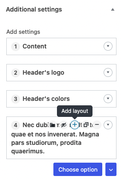
So I've created custom CSS fix for that for my theme purposes:
.is-side .acf-flexible-content .layout {
    padding-bottom: 32px;
}

.is-side .acf-flexible-content .layout .acf-fc-layout-controls {
    top: unset;
    bottom: 8px;
}

.is-side .acf-flexible-content .layout .acf-icon.acfe-flexible-icon.dashicons,
.is-side .acf-flexible-content .layout .acf-fc-layout-controls .acf-icon.-plus,
.is-side .acf-flexible-content .layout .acf-fc-layout-controls .acf-icon.-minus,
.is-side  .acf-flexible-content .layout .acf-fc-layout-controls .acf-icon.-duplicate {
    visibility: visible;
}

.is-side .acf-flexible-content .acf-actions {
    margin-top: 32px;
}
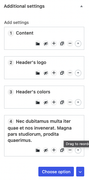
I hope it's gonna help :)
Contributor guide
No contributing guide indexed for this repository
First steps
- Read the whole issue, then the project's contributing guide.
- Comment on the issue to say you are picking it up — it saves two people doing the same work.
- Fork the repository and make your change on a branch.
- Open a pull request that references the issue number.
Research direction
No repository file or test is named; begin by locating the Flexible layouts side-layout styles and the row title/control markup. Reproduce the cramped title and options icons using the linked screenshots, then verify the controls remain usable without overlapping or losing spacing.
Written by the indexing model from the issue text.
Assessment
- Tech stack
- css
- Domain
- frontend
- Issue type
- Bug
- Difficulty
- 3/5
- Estimated time
- 1-2 days
- Activity status
- Stale
- Clarity
- Mostly clear
- Newbie friendliness
- 42/100