AdvancedCustomFields / AdvancedCustomFields/acf
HTML (svg) in select2 label getting escaped
Nobody has claimed this yet.
- Dominant language
- PHP
- Stars
- 945
- Forks
- 197
- PR merge metrics
- No merged PRs in 30d
Description
I have a select2 field that's loading SVGs as options. This still works fine, however the selected svg is escaped so you visually see HTML.
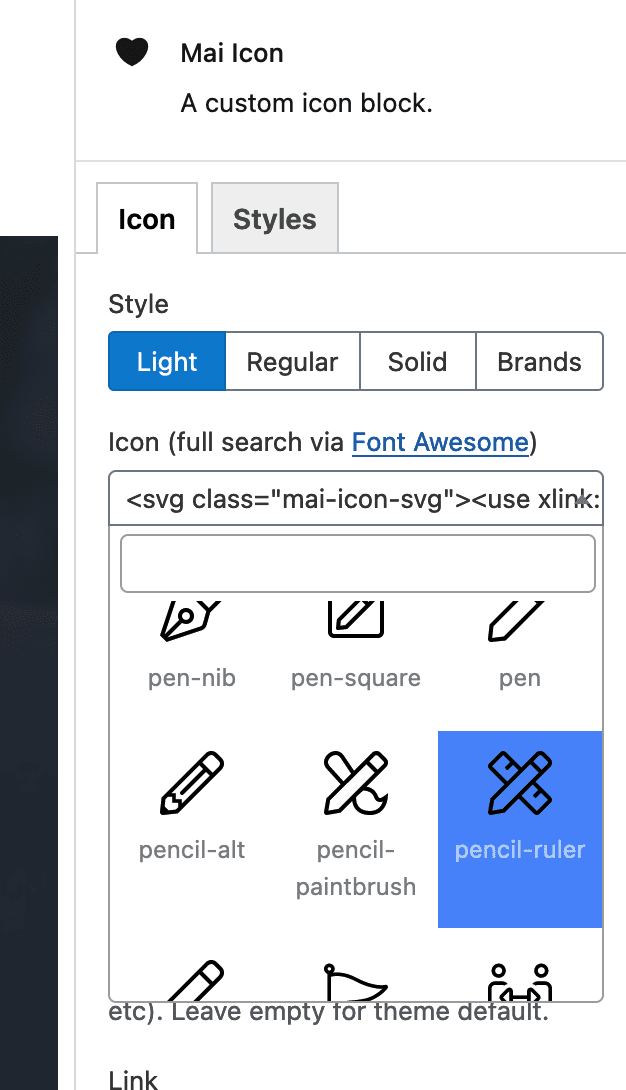
I'm loading the svg's via a sprite like this:
<svg class="mai-icon-svg"><use xlink:href="https://maitheme.local/success-business/wp-content/plugins/mai-icons/icons/sprites/light.svg#pencil-ruler"></use></svg><span class="mai-icon-name">pencil-ruler</span>
It looks like the escaping may be happening via JS so I'm not sure where dig to fix. Thanks y'all.
Contributor guide
No contributing guide indexed for this repository
First steps
- Read the whole issue, then the project's contributing guide.
- Comment on the issue to say you are picking it up — it saves two people doing the same work.
- Fork the repository and make your change on a branch.
- Open a pull request that references the issue number.
Research direction
The report identifies a select2 field and SVG/HTML markup, but no repository files or tests. Start by tracing the JavaScript rendering and escaping path for the selected option; done means the selected SVG renders visually instead of displaying escaped HTML, while existing option behavior remains intact.
Written by the indexing model from the issue text.
Assessment
- Tech stack
- html, javascript
- Domain
- frontend
- Issue type
- Bug
- Difficulty
- 3/5
- Estimated time
- 1-2 days
- Activity status
- Stale
- Clarity
- Needs clarification
- Newbie friendliness
- 25/100