AdvancedCustomFields / AdvancedCustomFields/acf
5.9 beta - Problems with wp_json_encode or <script> tags within JSX blocks
Nobody has claimed this yet.
- Dominant language
- PHP
- Stars
- 945
- Forks
- 197
- PR merge metrics
- No merged PRs in 30d
Description
Problem
I'm trying to use wp_json_encode to pass data in a data-attribute to a JSX-enabled ACF block. It works on the frontend, but in the ACF preview in the block editor, the data is not encoded properly. It shows up as : [object Object] (see screenshot). Removing the __experimental_jsx support flag fixes the issue.
As a workaround, I also tried to include the data in a <script> tag within the block, also using wp_json_encode. In this case the data appears to be encoded correctly (see screenshot), but the script does not execute. Removing the __experimental_jsx support flag fixes the issue, and the script executes.
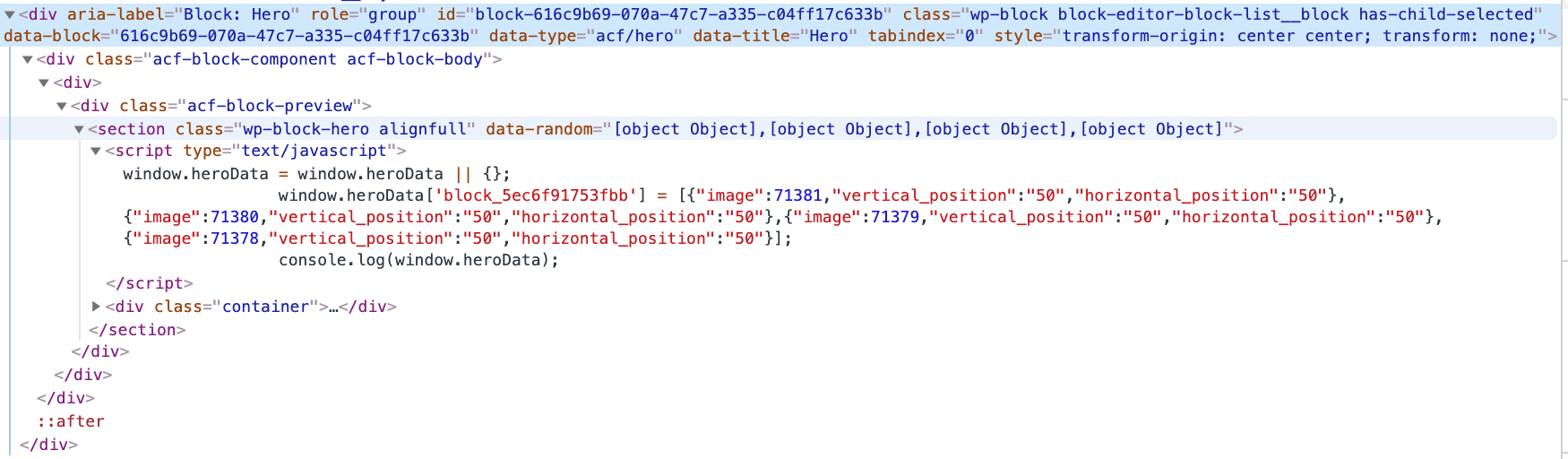
Code
<?php
acf_register_block_type(array(
    'name'              => 'hero',
    'title'             => __('Hero'),
    'description'       => __('Display a random hero image.'),
    'supports'          => array('__experimental_jsx' => true),

    'render_callback'   => function($block) {
      $className = $block['className'] ?: '';
      $images = get_field('images');
      if (!empty($images)):
        ?>
          <section class="wp-block-hero alignfull" data-random="<?= esc_attr(wp_json_encode($images)) ?>">
            <script type="text/javascript">
              window.heroData = window.heroData || {};
              window.heroData['<?= $block['id'] ?>'] = <?= wp_json_encode($images) ?>;
              console.log(window.heroData);
            </script>
            <div class="container">
              <InnerBlocks />
            </div>
          </section>
        <?php
      endif;
    }
  ));
Contributor guide
No contributing guide indexed for this repository
First steps
- Read the whole issue, then the project's contributing guide.
- Comment on the issue to say you are picking it up — it saves two people doing the same work.
- Fork the repository and make your change on a branch.
- Open a pull request that references the issue number.
Research direction
Reproduce the issue in the ACF block editor preview using the supplied render_callback, focusing on wp_json_encode output in the data attribute and script tag with __experimental_jsx enabled. Compare the behavior with that support flag removed. Done means the encoded data remains usable in the preview and the script executes while JSX support is enabled.
Written by the indexing model from the issue text.
Assessment
- Tech stack
- php, wordpress
- Domain
- frontend, web-dev
- Issue type
- Bug
- Difficulty
- 4/5
- Estimated time
- 3-5 days
- Activity status
- Stale
- Clarity
- Mostly clear
- Newbie friendliness
- 35/100