AdguardTeam / AdguardTeam/AdguardBrowserExtension
Add a dedicated link/icon to the filter URL
- 主要言語
- TypeScript
- スター
- 4.4k
- フォーク
- 449
- PR マージ指標
- 30日以内にマージされた PR はありません
説明
###### 💻 AdGuard AdBlocker Beta (Standalone) `4.1.55` on Firefox `112.0.1` — Win 10 Pro 22H2
_Hi there!_ As a user of both **AG for Windows** (on my Windows) and **AG Browser extension** (on my Linux traditionally, except when testing like here), I spotted an annoying difference.
# 🔍 Issue Details
### 🪟 ᴀᴅɢᴜᴀʀᴅ ᴀᴘᴘ
! Homepage: URL is found in a given filter?
↬ `Copy homepage link` will appear in the [context menu](https://user-images.githubusercontent.com/4764956/233114357-2ffa3ee6-abbc-45d8-a42e-38f2a098a706.png) — _**ᴀꜱ ᴇxᴘᴇᴄᴛᴇᴅ. ✔️**_
_…Not found?_
↬ **Nothing** will appear in the [context menu](https://user-images.githubusercontent.com/4764956/233114347-aac6f099-db6d-4d07-9818-d88c322928f7.png) — _**ᴀꜱ ᴇxᴘᴇᴄᴛᴇᴅ. ✔️**_
### 🧩 ᴀᴅɢᴜᴀʀᴅ ᴇxᴛᴇɴꜱɪᴏɴ
! Homepage: URL is found in a given filter?
↬ `Go to homepage` link will use this URL — _**ᴀꜱ ᴇxᴘᴇᴄᴛᴇᴅ. ✔️**_
_…Not found?_
↬ `Go to homepage` link will use the **filter URL** instead _(as a fallback)_ — _**ʜᴍ …… 💭**_
# 💡 Proposed solution
### 🧩 ᴀᴅɢᴜᴀʀᴅ ᴇxᴛᴇɴꜱɪᴏɴ
- [ᴏᴘᴛɪᴏɴᴀʟ] Migrate the `Go to homepage` link to a graphical 🏠 **Home icon** (going to Homepage) and
- add a graphical 🧾 **File code icon** (going to Filter URL).
… ↷
- First one will appear **only** if a Homepage line is found in the filter; — _(Consistently with the app.)_
- Second will always exist, _at the very least_ for Custom filters. — _(To be added in the app too, see below.)_
- ʙᴏᴛʜ ꜱʜᴏᴜʟᴅ ʙᴇ ᴏᴋ ʀᴇɢᴀʀᴅɪɴɢ ᴀᴄᴄᴇꜱꜱɪʙɪʟɪᴛʏ ᴀɴᴅ ʙᴇ ᴛᴀʙʙᴀʙʟᴇ.
### 🪟 ᴀᴅɢᴜᴀʀᴅ ᴀᴘᴘ
Either:
- replace the current `Copy homepage link` entry with a new **`Copy…`** entry containing the submenus `Homepage link` and `Filter URL` or
- … just add a new root entry `Copy filter URL`.
That is to say, an enhancement of [this issue](https://github.com/AdguardTeam/AdguardForWindows/issues/3790) — but I will open a dedicated issue linked to mine on this repo if you like my idea. ✔️
# 📷 Screenshots
Reveal …
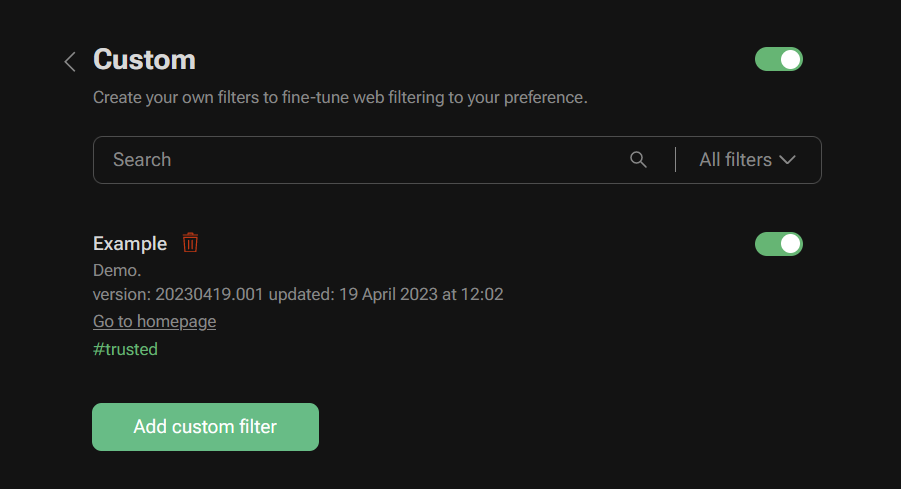
↪️ From the current situation …
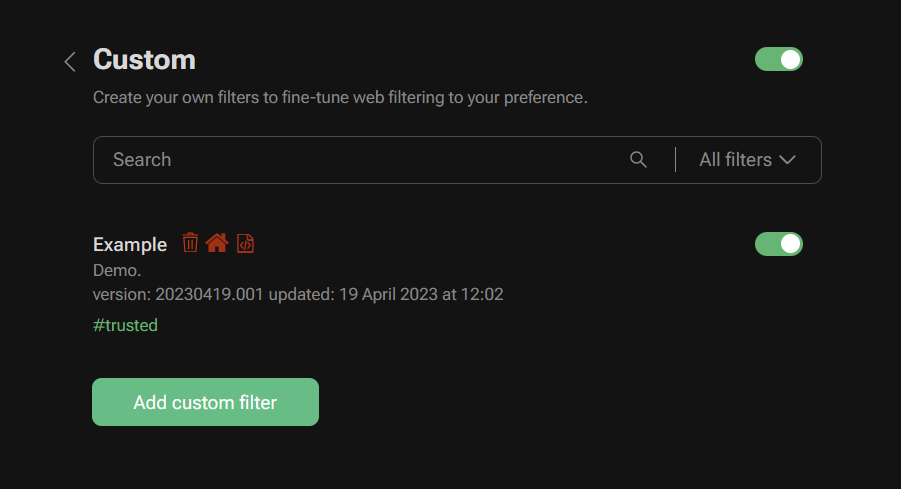
↪️ To this situation (with the _current_ trash icon preserved) …
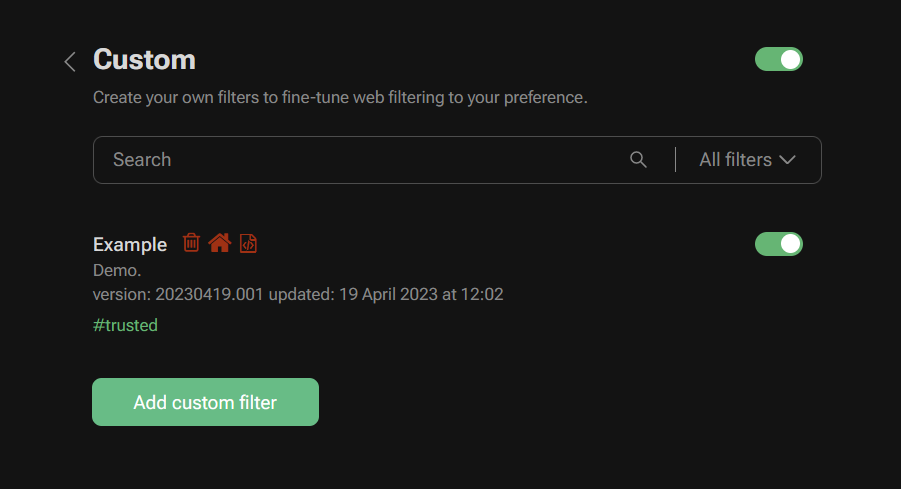
↪️ Or this **variant** situation (with the trash icon from _Fork Awesome_, just like the other two — all available [here](https://forkaweso.me/Fork-Awesome/icon/trash-o/), [here](https://forkaweso.me/Fork-Awesome/icon/home/) and [there](https://forkaweso.me/Fork-Awesome/icon/file-code-o/) and set to 80% opacity) …
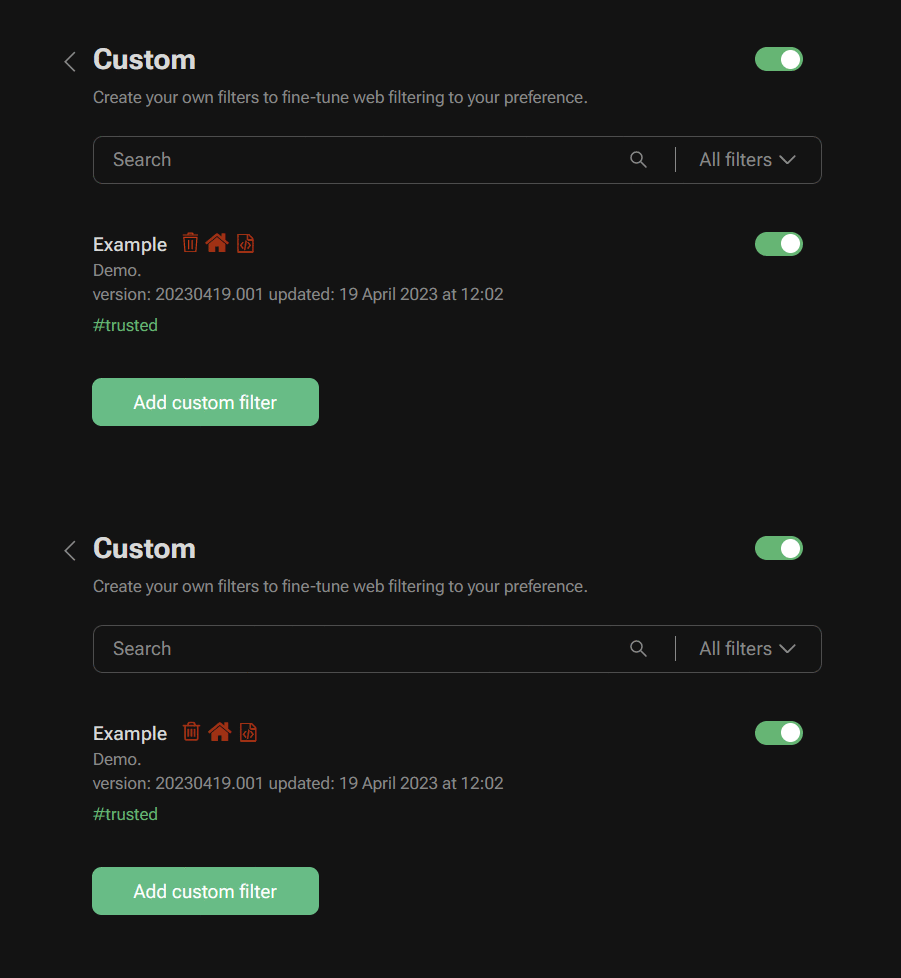
↪️ **BONUS:** Animated version for comparison between the two versions …
コントリビューションガイド
このリポジトリのコントリビューションガイドは索引されていません
評価
この issue はまだ評価されていません。